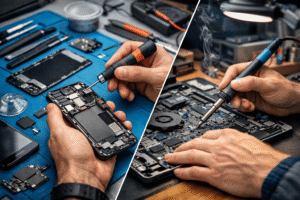
Laptop and PC repairing has become an important practical skill. From slow performance and overheating to broken screens and faulty power ports, many common computer problems can be fixed with the right tools and basic knowledge.
If you are a beginner, the biggest confusion is not how to repair, but which tools you actually need. Buying unnecessary tools wastes money, while missing essential ones makes repair work difficult or unsafe.
This guide explains a complete laptop & PC repairing tools list, written for novices. It focuses on real-world usage, practical tips, and beginner-friendly explanations so you can confidently start learning computer repair.
Understanding Laptop & PC Repairing Tools
Laptop and PC repairing tools are specialized hand tools, electronic tools, and safety equipment used to open, diagnose, repair, clean, and reassemble computers.
Unlike general household tools, computer repair tools are:
- Smaller and more precise
- Designed to prevent component damage
- Made to handle sensitive electronic parts
Using the correct tools improves repair quality, safety, and speed.
Basic Categories of Laptop & PC Repairing Tools
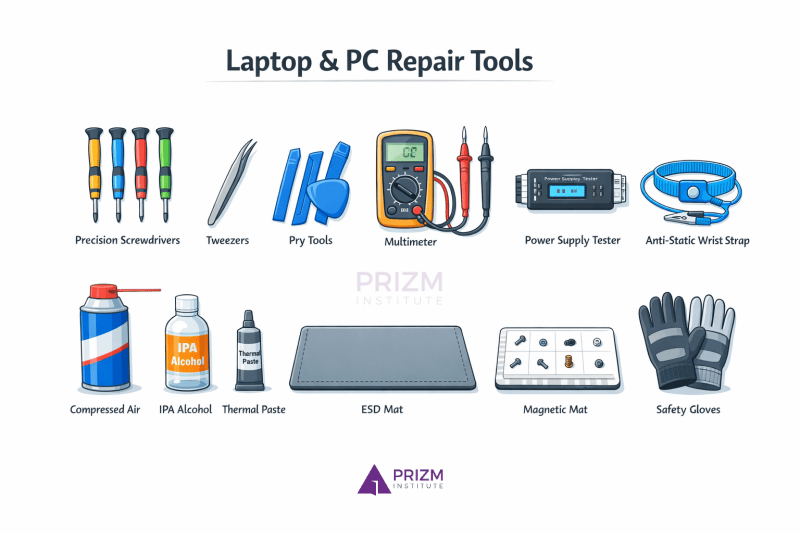
For better understanding, laptop and PC repairing tools can be grouped into five main categories:
- Hand tools
- Opening and prying tools
- Diagnostic and testing tools
- Cleaning and maintenance tools
- Safety and protection tools
Let’s explore each category in detail.
1. Essential Hand Tools for Laptop & PC Repairing
Precision Screwdriver Set
A precision screwdriver set is the most important tool for computer repair.
Common screwdriver types:
- Phillips (+)
- Flat (–)
- Torx (T5, T6, T8)
- Pentalobe (used in some laptops)
Practical tip:
Always use the exact screwdriver size. Wrong sizes damage screw heads and make removal difficult.
Tweezers
Tweezers are used to handle:
- Small screws
- Ribbon cables
- Jumpers and connectors
Choose ESD-safe stainless steel tweezers for electronics work.
Spudger (Plastic Pry Tool)
A spudger is used to:
- Disconnect battery connectors
- Lift ribbon cables
- Separate delicate components
Why plastic matters:
Metal tools can short circuits. Plastic spudgers are safer for internal work.
2. Opening and Prying Tools
Plastic Pry Tools
Used to open laptop panels without scratching or cracking the body.
Common uses:
- Opening back covers
- Separating bezels
- Removing keyboard panels
Guitar Picks / Opening Cards
Thin plastic cards help slide between tight gaps during disassembly.
They are inexpensive and very effective for beginners.
Suction Cup
Used mainly for:
- Removing laptop screens
- Lifting glass panels safely
A suction cup reduces the risk of screen breakage.
3. Diagnostic and Testing Tools
Digital Multimeter
A multimeter is essential for electrical testing.
It helps check:
- Voltage
- Continuity
- Short circuits
- Power adapter output
Beginner tip:
Learn basic multimeter modes before using it on a motherboard. Here are the best multimeters for electronics repairing you can choose from.
Power Supply Tester (Desktop PCs)
Used to quickly check whether a PC power supply is working correctly.
It saves time compared to manual voltage testing.
POST Diagnostic Card
Used mainly for desktop PCs to diagnose motherboard errors when the system does not boot.
It displays error codes that help identify faulty components.
4. Cleaning and Maintenance Tools
Compressed Air Blower
Used to remove:
- Dust from fans
- Dirt from vents
- Debris from keyboards
Dust buildup is a major cause of overheating.
Isopropyl Alcohol (IPA)
Used for:
- Cleaning thermal paste
- Removing corrosion
- Cleaning circuit boards
Recommended concentration:
90% or higher for electronics.
Thermal Paste
Applied between:
- CPU and heatsink
- GPU and cooling plate
Fresh thermal paste improves cooling and system stability.
Anti-Static Brush
Used to gently clean:
- Motherboards
- RAM slots
- Cooling fins
Avoid using hard or metallic brushes.
5. Safety and Protection Tools
Anti-Static Wrist Strap
Protects sensitive components from static electricity damage.
Always ground yourself before touching internal parts.
ESD Mat
An anti-static mat provides a safe working surface and prevents component loss.
Magnetic Project Mat
Helps organize screws by location.
Practical benefit:
Prevents confusion during reassembly, especially for beginners.
Optional but Useful Advanced Tools
Once you gain experience, these tools become useful:
- Hot air rework station (for chip-level repair)
- USB bootable diagnostic tools
- External hard drive enclosure
- CMOS battery tester
- Soldering iron (basic repairs only)
These are not mandatory for beginners, but helpful later.
If you wish to make a career in computer repairs, you can join our computer hardware and networking course in Mumbai and start a rewarding career in this field.
Common Mistakes Beginners Make
Avoid these common errors:
- Using wrong screwdriver sizes
- Forgetting to disconnect the battery
- Not grounding yourself
- Mixing screws of different lengths
- Forcing connectors or panels
- Skipping cleaning before reassembly
Small mistakes can cause permanent damage.
Practical Tips for Beginners
- Start with old or unused laptops for practice
- Take photos during disassembly
- Label screws and components
- Watch manufacturer teardown guides
- Work slowly and patiently
- Invest in tool quality, not quantity
Pros and Cons of DIY Laptop & PC Repairing
Pros
- Saves repair costs
- Builds technical skills
- Faster troubleshooting
- Career and freelancing opportunities
Cons
- Risk of damage if inexperienced
- Initial tool investment
- Warranty may be void
- Requires patience and practice
If you wish to learn laptop repairs, you can join our laptop repairing course in Mumbai and start a rewarding career in this field.
Frequently Asked Questions (FAQs)
1. What are the most important tools for beginners?
A precision screwdriver set, plastic pry tools, tweezers, multimeter, and cleaning tools are essential.
2. Do I need expensive tools to start laptop repairing?
No. A basic toolkit is enough for beginners. Advanced tools are needed only for complex repairs.
3. Is a multimeter necessary for laptop repair?
Yes. It helps diagnose power-related problems accurately.
4. Can I use normal household tools for computer repair?
Household tools are not recommended. They can damage screws and components.
5. Is laptop repairing safe for beginners?
Yes, if proper tools, safety precautions, and patience are followed.
6. How much does a basic laptop repair tool kit cost?
A beginner toolkit is affordable and usually costs much less than professional repair equipment.
Here is a good comparison between mobile repairing course and laptop repairing course if you are confused about which course you should join.
Conclusion
Laptop and PC repairing becomes much easier when you use the right tools for the right task. As a beginner, focus on essential tools, safety, and understanding how components fit together.
You do not need to buy everything at once. Start small, practice regularly, and upgrade your toolkit as your skills improve. With patience and proper tools, laptop and PC repairing can become a valuable technical skill and even a professional career path.