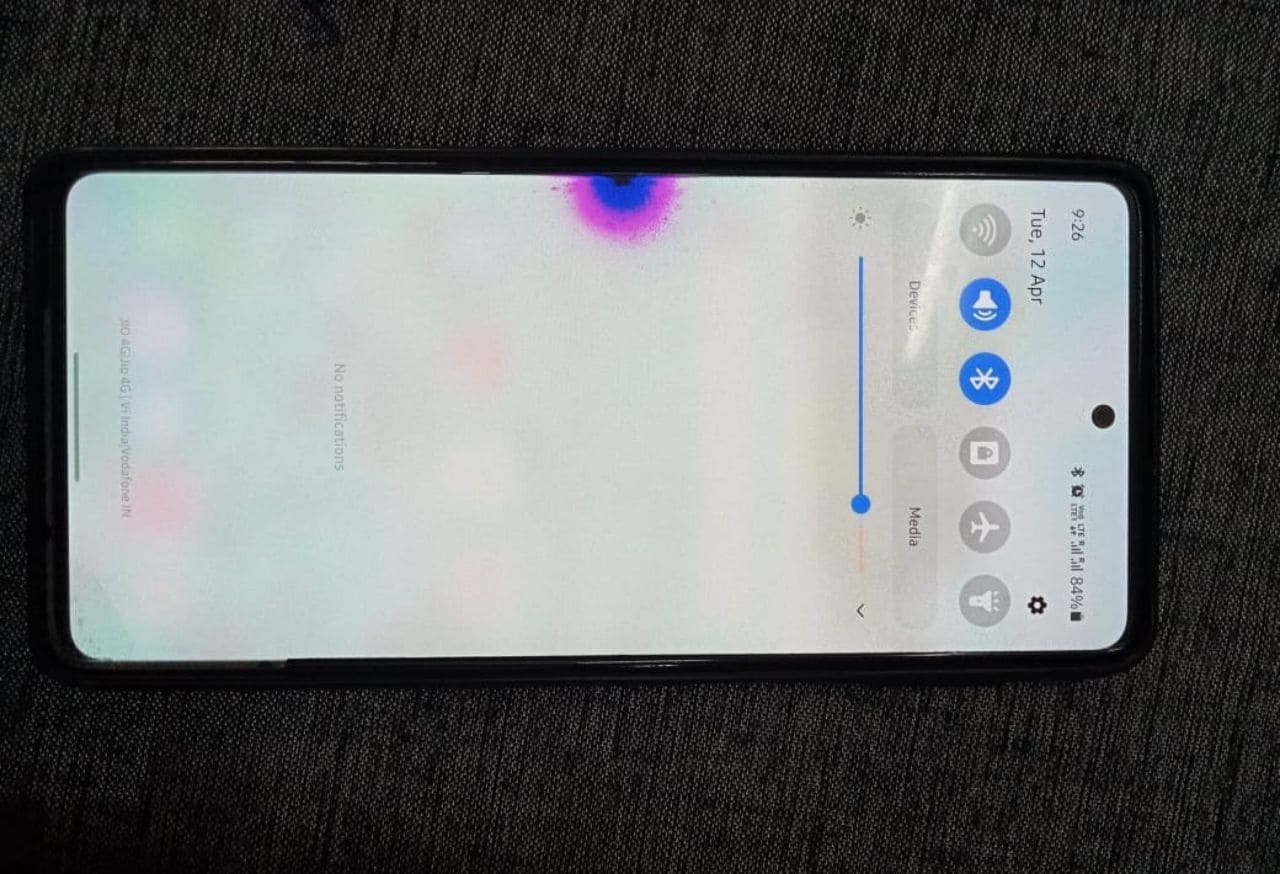
Noticing a pink, purple, or blue spot on your phone screen can be worrying. These colored patches often appear suddenly, sometimes after a drop, water exposure, or even without any obvious reason. Many users panic, assuming the phone is permanently damaged or needs an expensive screen replacement.
The good news is this – not all screen spots mean your phone is beyond repair. Some issues are temporary, some are software-related, and others are early warning signs that can still be managed if caught on time.
In this detailed guide, you will learn:
- What pink, purple, or blue spots on a phone screen actually mean
- The real causes behind these display issues
- Proven troubleshooting steps you can safely try at home
- When a screen can be fixed and when replacement is unavoidable
- Practical tips to prevent the problem in the future
This article is written for beginners and intermediate users, covering Android phones, iPhones, and other smartphones used in India and globally.
What Does a Pink, Purple, or Blue Spot on a Phone Screen Mean?
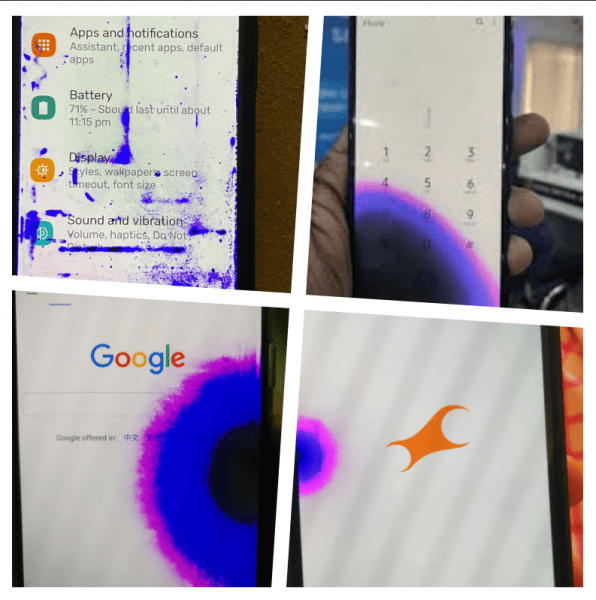
A colored spot on a smartphone display usually indicates uneven light or pixel behavior inside the screen panel. These spots may:
- Stay fixed in one area
- Slowly grow over time
- Appear more clearly on white or light backgrounds
- Change intensity when screen brightness is adjusted
Common colors and what they suggest
| Spot Color | What It Usually Indicates |
|---|---|
| Pink spot | Pressure damage, OLED pixel issue |
| Purple spot | Internal crack or liquid damage |
| Blue spot | LCD backlight problem or stuck pixels |
These colors are symptoms, not the root problem. Understanding the cause is key before trying any fix.
Types of Phone Displays and Why It Matters
Before fixing anything, it helps to know what kind of screen your phone uses, because the causes and solutions differ.
LCD Display (Mostly budget and older phones)
- Uses a backlight behind liquid crystals
- Common in older Android phones and entry-level models
- Blue or white spots are more common
OLED or AMOLED Display (Modern smartphones)
- Each pixel emits its own light
- Used in most premium Android phones and all modern iPhones
- Pink or purple blotches are more common
Phones from Samsung, Apple, Vivo, Oppo, OnePlus, Xiaomi, and others mostly use AMOLED or OLED panels today.
Main Causes of Pink, Purple, or Blue Spots on Phone Screens
1. Physical Impact or Pressure Damage
This is the most common cause.
- Phone dropped on a hard surface
- Heavy object placed on the screen
- Sitting with the phone in a tight pocket
Even if the glass does not crack, internal layers of the display can be damaged.
Real-world example:
Many users report a small purple spot appearing a day or two after dropping their phone, which slowly spreads across the screen.
2. Liquid or Moisture Damage
Water does not always cause immediate failure.
- Rain exposure
- Sweat during workouts
- Steam in bathrooms
- Accidental spills
Moisture can seep inside and damage display circuits, causing colored patches that grow over time.
Important: Even water-resistant phones are not waterproof forever.
3. Dead, Stuck, or Burnt Pixels
Pixels can fail individually.
- Dead pixel – stays black
- Stuck pixel – stays red, green, or blue
- Burnt pixel – uneven color in OLED screens
When multiple pixels fail together, they appear as a colored spot or blotch.
4. OLED Burn-In or Image Retention
Common in AMOLED and OLED screens.
Caused by:
- High brightness for long periods
- Static images like navigation bars
- Gaming HUDs or status icons
Burn-in often appears as pink or purple shading on white backgrounds.
5. Display Connector or Motherboard Issue
Sometimes the screen itself is fine.
- Loose display connector
- Minor motherboard fault
- Power irregularities
These can cause temporary color patches that change or flicker.
6. Manufacturing Defect or Aging Display
Over time, displays degrade.
- Older phones may develop color spots without damage
- Rare factory defects may appear after weeks or months
If your phone is under warranty, this matters a lot.
1-Minute Diagnostic Checklist – Identify the Cause Quickly
Use this simple 1-minute checklist to understand what is most likely causing the pink, purple, or blue spot on your phone screen.
Answer each question honestly.
Quick diagnosis checklist
- Did the spot appear after a drop or impact?
→ Likely internal display layer damage - Did the spot appear after rain, sweat, or liquid exposure?
→ Likely moisture damage - Is the spot purple or pink and slowly spreading?
→ Likely OLED pixel bleeding - Is the spot blue or white and fixed in one area?
→ Likely LCD backlight or pixel issue - Is the spot visible only on white or light backgrounds?
→ Likely burn-in or pressure damage - Does the spot disappear after restart or in Safe Mode?
→ Possible software or GPU glitch
Proven Fixes You Can Try at Home (Safe Methods)
Step 1 – Restart the Phone
It sounds basic, but always start here.
- Clears temporary glitches
- Resets display drivers
If the spot disappears, it was likely a software issue.
Step 2 – Check in Safe Mode (Android)
Safe Mode disables third-party apps.
- If the spot disappears in Safe Mode, an app is causing the issue
- Remove recently installed apps
This is especially useful for Android smartphones.
Step 3 – Test with Solid Color Screens
Open full-screen colors:
- White
- Black
- Red, Green, Blue
You can use display test apps or simple images.
What this tells you:
- Spot visible on all colors – hardware damage
- Spot visible only on white – burn-in or pressure damage
Step 4 – Reduce Screen Brightness
Lower brightness for a few days.
- Helps slow OLED burn-in
- May reduce visibility of minor spots
This does not fix physical damage, but can prevent worsening.
Step 5 – Pixel Fix Apps (Limited Use)
Some apps rapidly change colors to revive stuck pixels. They are simple to use and safe when run for short periods, but they cannot repair fully dead pixels caused by hardware damage.
- Works only for stuck pixels
- Does not fix cracks or liquid damage
Use cautiously and do not expect miracles.
Android Apps
- Dead Pixels Test and Fix – Tests your screen and runs color cycles to unstick pixels
https://play.google.com/store/apps/details?id=com.zoox.deadpixelfix - Pixel Fixer – Detects stuck pixels and attempts recovery using solid color flashing
https://play.google.com/store/apps/details?id=com.maher.pixelfixer
iOS Apps
- Pixel Control – Helps identify stuck or dead pixels and checks display uniformity
https://apps.apple.com/app/id6469455300 - Dead Pixel Detect and Fix – Displays color patterns to spot and fix stuck pixels
https://apps.apple.com/app/id1501567638
Tip: If a pixel stays black or white even after using these apps, the issue is likely permanent and requires screen replacement.
Step 6 – Remove Case and Let Phone Dry
If moisture is suspected:
- Power off immediately
- Remove case and SIM tray
- Keep in a dry place with airflow
Avoid rice myths. Rice does not remove internal moisture reliably.
The above repair tips are the same for all smartphone brands like Samsung, iPhone, OnePlus, Vivo, Oppo, Realme, Xiaomi, Poco, Nothing, Motorola, etc.
What NOT to Do (Very Important)
Many online tips can make things worse.
- ❌ Do not press hard on the spot
- ❌ Do not heat the screen with hair dryers
- ❌ Do not open the phone without tools or experience
- ❌ Do not apply liquids or chemicals
These actions often spread the damage.
When Screen Replacement Is the Only Real Solution
Unfortunately, some cases cannot be fixed at home.
Screen replacement is required when:
- Spot grows larger over time
- Touch stops working in that area
- Colors distort heavily
- Black ink-like blotch spreads
For OLED screens, panel replacement is the only permanent fix once internal layers are damaged.
While if you’ve heard green line or green tint issues during updates, prevention is better than repair. This guide to preventing green lines on phone screens during software updates breaks down update-related risks and how to reduce them.
Repair vs Replacement – What Makes Sense?
| Situation | Best Option |
|---|---|
| Phone under warranty | Claim warranty |
| Small stuck pixel | Try pixel fix app |
| Spreading purple blotch | Replace screen |
| Old budget phone | Consider replacement |
| Expensive flagship phone | Screen repair |
Always balance repair cost vs phone value.
How to Prevent Screen Spot Issues in the Future
- Use a good quality case with raised edges
- Apply a tempered glass screen protector
- Avoid keeping phone in back pockets
- Keep brightness below maximum when possible
- Avoid water exposure even on resistant phones
Prevention is far cheaper than repair.
Pros and Cons of Fixing vs Ignoring the Spot
Pros of Fixing Early
- Prevents spread of damage
- Maintains resale value
- Better viewing experience
Cons of Ignoring the Issue
- Spot usually grows
- Touch may fail later
- Repair cost increases
Early action almost always saves money.
Repair Technician Insight – What Professionals See in Real Life
Based on common observations from mobile repair technicians, pink, purple, or blue spots on phone screens almost always indicate internal panel damage rather than surface issues.
Key insights from real repair cases:
- Small purple or pink spots rarely stay small. In most OLED and AMOLED screens, the damaged area slowly spreads over days or weeks.
- Pressure damage often appears even when the glass is not cracked. The internal display layers are far more fragile than the outer glass.
- Liquid-damaged screens usually worsen, even if the phone seems fine initially. Corrosion continues internally.
- Pixel-fix apps almost never work for blotches caused by impact or moisture. They only help with rare stuck pixels.
- Once an OLED panel shows a colored blotch, panel replacement is the only permanent solution.
This is why technicians usually advise early repair or timely data backup, rather than waiting for complete display failure.
Important – Back Up Your Data Before the Spot Gets Worse
A colored spot on the phone screen is not just a visual issue. It can be an early warning sign of sudden display failure.
Why data backup is critical:
- The spot may spread and block touch input
- The screen may turn black without warning
- Unlocking the phone can become impossible
- Data recovery becomes difficult and expensive
What you should back up immediately
- Photos and videos
- Contacts
- WhatsApp and chat backups
- Important documents and notes
Recommended backup options
- Cloud backup using Google Drive or iCloud
- Transfer files to a computer using USB
- Export critical chats manually
Backing up data early is a trustworthy and responsible step, even if you plan to repair the phone later.
Temporary Workarounds to Reduce Visibility (Not a Permanent Fix)
If the phone is still usable, these temporary workarounds can improve usability while you decide on repair or replacement.
Helpful temporary steps
- Enable dark mode to reduce contrast
- Use a black or dark wallpaper
- Reduce screen brightness
- Avoid static images for long periods
- Hide navigation bars if possible
What to keep in mind
These methods do not fix the damaged display. They only reduce strain on affected pixels and make the spot less noticeable.
Think of them as short-term relief, not a solution.
When It Makes Sense NOT to Repair the Screen
Repair is not always the smartest option. Sometimes, choosing not to repair is the more practical decision.
You may skip repair if:
- The phone is very old and slow
- Screen replacement costs more than 50 percent of phone value
- The device is a backup or secondary phone
- The spot is small and not affecting usability
- You are planning an upgrade soon
In such cases, backing up data and continuing limited use may be more sensible than spending heavily on repairs.
Screen Repair Cost Calculator – Is Repair Worth It?
Before rushing into repair, use this practical cost comparison table to decide whether fixing the screen makes financial sense.
Approximate screen repair cost comparison
| Phone Category | Display Type | Typical Repair Cost | Repair Recommended? |
|---|---|---|---|
| Budget Android phones | LCD | Low | Yes, if phone is otherwise fine |
| Mid-range Android phones | LCD or AMOLED | Medium | Yes, depending on phone age |
| Premium Android phones | AMOLED or OLED | High | Yes, if device is under 2–3 years old |
| Older flagship phones | AMOLED or OLED | High | Only if cost is reasonable |
| iPhone models | OLED | Very High | Consider phone value and warranty |
Simple rule to decide
- If repair cost is under 40 percent of phone’s current value → Repair makes sense
- If repair cost exceeds 50 percent of phone value → Replacement is usually smarter
- If phone is under warranty → Always check warranty first
Myths vs Reality About Colored Spots on Phone Screens
Many users fall for misleading advice online. Clearing these myths improves trust and prevents damage.
Myth – Pressing the screen can fix the spot
Reality: Pressing usually spreads the damage and worsens the blotch.
Myth – Rice fixes water-damaged screens
Reality: Rice does not remove internal moisture or corrosion.
Myth – Pixel-fix apps repair OLED blotches
Reality: Apps cannot repair physically damaged OLED layers.
Myth – Heating the screen helps
Reality: Heat can permanently damage display components.
Myth – Screen protectors cause color spots
Reality: Protectors do not create internal display blotches.
Understanding the facts helps users make safer and smarter decisions.
FAQs
Why does my phone screen have a purple spot after a fall?
A fall can damage internal display layers without cracking the glass. This causes light distortion, seen as purple or pink spots.
Can a blue spot on phone screen go away on its own?
If caused by a temporary pixel glitch, it might disappear. If caused by physical damage, it will not.
Is a pink spot on OLED screen permanent?
In most cases, yes. OLED pixel damage or burn-in is usually permanent and requires screen replacement.
Does software update fix screen color spots?
Software updates can fix display calibration issues, but cannot repair physical screen damage.
Can water damage cause purple spots later?
Yes. Moisture damage often appears days or weeks after exposure and usually worsens over time.
Should I replace the screen or buy a new phone?
If repair cost exceeds 40–50 percent of phone value, replacement is often smarter.
Conclusion
A pink, purple, or blue spot on a phone screen is not just a cosmetic issue. It is a clear signal that something inside the display is not functioning normally. While some causes are minor and temporary, many are early warnings of deeper damage.
By understanding the cause, trying safe troubleshooting steps, and knowing when to seek professional repair, you can make the right decision for your smartphone. Acting early often prevents higher costs and data loss later.
If your phone is still usable, reduce brightness, back up your data, and monitor the spot carefully. If it spreads or worsens, screen replacement is the only reliable fix.
Your phone screen is one of its most delicate and expensive components – treating it carefully goes a long way.