You are not alone.
Thousands of mobile phone users across India are facing this issue where a message pops up repeatedly saying it is a government alert, even though it looks suspicious and annoying. Many people are calling it an Extremely Severe Alert fake virus, thinking their smartphone is hacked or infected.
In this detailed guide, you will learn:
- What this alert actually is
- Whether it is a real virus or not
- Why it keeps coming again and again
- Step by step methods to stop it
- Practical fixes for both Android and iPhone
- Tips to prevent such issues in the future
Let’s break it down in simple terms.
What Is the “Extremely Severe Alert” Message?
The message you are seeing looks like this:
Extremely severe alert
India launches Cell Broadcast using indigenous technology…
No action is required. This is a test message.
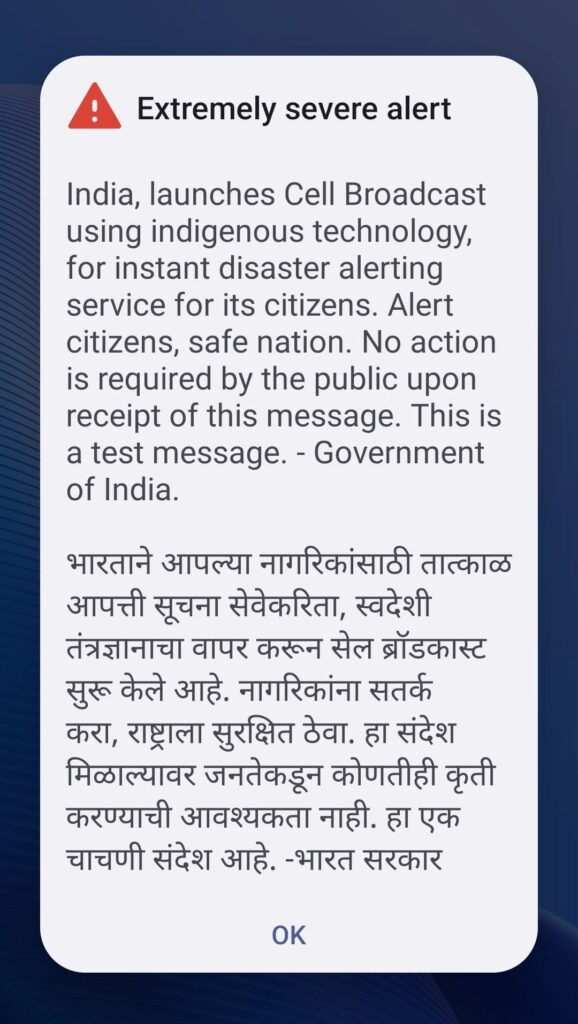
This alert is part of a Cell Broadcast system, which is used by governments to send emergency notifications like:
- Natural disasters
- Weather warnings
- National safety alerts
Important clarification
This is NOT a virus in most cases.
It is an official test message sent through telecom networks. However, the problem is not the alert itself, but the frequency and behavior.
Why Is This Alert Repeating Again and Again?
This is where the confusion starts.
Even though it is a legitimate broadcast, many users experience:
- Repeated alerts every few minutes
- Loud siren-like sound
- Alert not disappearing properly
- Phone getting stuck or lagging
Common reasons:
- Network testing phase
- Telecom providers may send multiple test signals
- Phone settings issue
- Emergency alert settings may be misconfigured
- Software glitch
- Bug in Android or iPhone system
- Carrier network loop
- Your device keeps re-receiving the same broadcast
- Outdated system update
- Older versions may handle alerts poorly
Is It a Fake Virus or Real Threat?
Let’s be clear:
It is NOT a virus if:
- Message mentions government broadcast
- No link or download is asked
- No app installation prompt appears
It MAY be suspicious if:
- It asks you to click a link
- It asks for personal details
- It redirects you to unknown apps
Golden rule:
“If a message asks for action, verify. If it only informs, observe.”
How to Get Rid of Extremely Severe Alert (Step by Step Fix)
Here are practical solutions that actually work.
1. Restart Your Phone
This is the simplest and most effective first step.
Why it works:
- Clears temporary bugs
- Stops alert loop
- Refreshes network connection
Steps:
- Press and hold power button
- Tap Restart
- Wait for device to reboot
2. Turn Off Internet Temporarily
If alerts are coming continuously:
- Turn off mobile data
- Turn off WiFi
- Wait for 5 to 10 minutes
This helps stop repeated broadcasts.
3. Disable Emergency Alerts (Android)
This is one of the most effective fixes.
Steps:
- Open Settings
- Go to Notifications
- Find Emergency Alerts or Wireless Alerts
- Turn off:
- Severe alerts
- Extreme alerts
- Test alerts
Different Android phones may show slightly different names.
4. Disable Government Alerts (iPhone)
On iPhone, alerts can also be controlled.
Steps:
- Open Settings
- Tap Notifications
- Scroll to bottom
- Turn off:
- Emergency Alerts
- Public Safety Alerts
5. Update Your Phone Software
Outdated software can cause alert glitches.
Steps:
- Go to Settings
- Tap Software Update
- Install latest update
This often fixes repeated alert bugs.
6. Remove Suspicious Apps
Even though this alert is usually not a virus, you should still check:
- Recently installed apps
- Unknown or third party apps
Delete anything suspicious. To disgnose all functions in android phone you can use free Android disgnostic codes to test each and every function.
7. Reset Network Settings
If alerts still continue, try this.
Steps:
- Go to Settings
- Reset
- Select Network Settings Reset
Note: This will remove saved WiFi passwords.
8. Use Do Not Disturb Mode
If the sound is disturbing:
- Enable Do Not Disturb
- Silence notifications temporarily
This is a quick relief method.
Real Life Example
Many users in cities like Mumbai reported:
- Alerts coming every 5 to 10 minutes
- Loud beep during meetings and sleep
- Phone becoming unusable
After disabling emergency alerts and restarting the device, the issue stopped completely.
Common Mistakes to Avoid
Avoid these errors while fixing the issue:
- Do not install random antivirus apps
- Most are unnecessary and slow your phone
- Do not click unknown links
- Could lead to real malware
- Do not factory reset immediately
- Try simple fixes first
- Do not panic
- This is usually not harmful
Tips to Prevent Future Alert Issues
Here are some best practices:
- Keep your smartphone updated
- Avoid installing apps from unknown sources
- Regularly check notification settings
- Restart your phone once a week
- Use trusted apps only
Pros and Cons of Emergency Alerts
Pros:
- Useful during real emergencies
- Provides life saving information
- Works without internet
Cons:
- Can be annoying during tests
- Loud sounds can disturb
- Repeated alerts can cause panic
For Students and Professionals
Students:
- Alerts during exams can be distracting
- Turn off alerts before important study time
Business owners:
- Alerts during meetings can interrupt communication
- Keep phone on silent or disable alerts during work hours
A Thought to Remember
“Technology is meant to protect us, but understanding it is what truly keeps us safe.”
FAQs
1. Is Extremely Severe Alert a virus?
No, it is usually a government test message, not a virus. It becomes a problem only when it repeats excessively.
2. Why is my phone making loud alert sounds?
Emergency alerts are designed to be loud so people notice them. Repeated sounds may be due to a system glitch.
3. Can I permanently disable these alerts?
Yes, you can turn them off in notification or emergency alert settings.
4. Will disabling alerts affect my safety?
You may miss real emergency warnings. So disable only if necessary and stay updated through other sources.
5. Why is the alert not going away?
This may happen due to a software bug or network broadcast loop. Restarting your device usually fixes it.
6. Should I install antivirus apps?
Not required unless you notice real suspicious activity. Most modern smartphones already have built in security.
Internal Linking Suggestions
- Anchor: How to remove virus from phone
Topic: Complete mobile virus removal guide - Anchor: Why my phone is slow suddenly
Topic: Smartphone performance troubleshooting - Anchor: Best security settings for Android
Topic: Mobile security tips and privacy guide - Anchor: Fix notification issues on iPhone
Topic: iPhone notification troubleshooting - Anchor: How to stop spam messages on phone
Topic: SMS and notification spam control
High Authority External Linking Options
- Anchor: Emergency alert system explained
Source: Government telecom website - Anchor: Mobile security best practices
Source: Google Safety Center - Anchor: Apple notification settings guide
Source: Apple official support - Anchor: Cyber safety tips for users
Source: CERT India
Keyword Clusters for Topical Authority
You can build multiple supporting articles using these clusters:
Cluster 1: Mobile Alert Issues
- emergency alerts not stopping
- phone alert sound not turning off
- government alert message problem
Cluster 2: Mobile Security
- how to remove virus from android phone
- signs your phone is hacked
- mobile phone security tips
Cluster 3: Notification Problems
- notifications not working android
- iphone notification bugs
- how to manage notifications
Cluster 4: Phone Performance
- phone hanging issue fix
- why phone is lagging
- optimize smartphone performance
Cluster 5: Network Issues
- mobile network glitch fixes
- reset network settings android
- why network alerts keep repeating
Conclusion
The Extremely Severe Alert fake virus issue may look scary at first, but in most cases, it is just a government test alert combined with a phone or network glitch.
The good news is that you can fix it easily.
Just follow these key steps:
- Restart your phone
- Disable emergency alerts
- Update your device
- Avoid unnecessary apps
These simple actions can stop the alerts and restore normal usage.
If the problem continues, you can contact your mobile service provider for support.
Stay informed, stay calm, and keep your device under your control.