Buying a smartphone—whether new, used, or refurbished—is a big investment. Unfortunately, duplicate, clone and fake phones are still common in offline markets and online listings. These devices often look genuine at first glance but use low-quality hardware, modified software, or fake branding. Over time, they cause poor performance, security risks, and money loss.
This detailed guide explains how to check if a phone is original or duplicate, step by step, for both Android phones and iPhones. You don’t need technical knowledge. Just follow these practical checks before paying.
Why It’s Important to Check Phone Originality
A duplicate or fake phone may cost less upfront, but it usually brings long-term problems:
- Slow performance, poor specs and frequent crashes
- No official software or security updates
- Higher risk of data theft
- No valid warranty or service support
- Poor resale value
You should know things to check when you are buying a new phone while if you are buying a used phone, please go through our used or second hand phone buying guide.
Understanding Duplicate, Clone and Fake Smartphones
A duplicate phone is a device that:
- Copies the design and name of a popular smartphone
- Uses cheap processors, cameras, and batteries
- Runs modified or fake Android software
- Shows false specifications in settings
These phones are commonly sold as:
- “Imported models”
- “Refurbished at very low price”
- “Same as original but cheaper”
Original smartphones are made following many authentic step-by-step processes and then reach stores.
Most Reliable Ways to Check If a Phone Is Original
1. Check the IMEI Number (Most Important Step)
The IMEI (International Mobile Equipment Identity) is a unique number given to every genuine mobile device.
How to check IMEI Number:
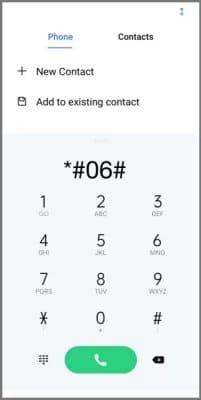
- Dial *#06# on the phone
- Note the IMEI number shown
- Match it with:
- IMEI on the phone box
- IMEI printed on SIM tray or back panel
- IMEI shown in Settings → About Phone
👉 All IMEI numbers must match.
If they don’t match, the phone is likely duplicate, repaired, or tampered.
You can also verify the IMEI on the manufacturer’s official website to confirm the brand and model.
How to Check a Stolen Phone Using IMEI
You can check whether a mobile phone is stolen or genuine by using the Sanchar Saathi CEIR IMEI Verification portal provided by the Government of India. Simply visit the official IMEI verification page, enter the phone’s 15-digit IMEI number and your mobile number, and submit the details. The system will show the current status of the device, such as whether it is active, blocked, or reported lost or stolen. This easy online check helps you stay safe while buying a new or second-hand phone and protects you from using illegal or blacklisted devices.
You can learn more Android phone secret codes that users often rely on.
What Information an IMEI Number Can Show
When you check your phone’s IMEI number, it can reveal:
- Phone brand and model
- Network compatibility
- Whether the phone is original or duplicated
- Manufacturing region approval
- Warranty status (on brand websites)
- Whether the phone is blocked, blacklisted, or reported stolen (region-based)
Learn and understand about IMEI Number in detail and get these details about your handset
2. Check Phone Details in Settings
Open Settings → About Phone (Android) or Settings → General → About (iPhone).
Check carefully:
- Brand name
- Model number
- Android or iOS version
- RAM and storage details
Red flags:
- Misspelled brand or model
- Unknown model numbers
- Android version that doesn’t match the phone’s release year
- RAM/storage values that change after restart
How to Check If an Android Phone Is Original
3. Use Android Hardware Test Codes
Most original Android phones support built-in test codes.
Try dialing:
- *#0*# → Hardware test menu (many brands)
- *#*#4636#*#* → Phone and network information
If these codes don’t work or show very limited info, it may indicate modified software.
4. Check Hardware Using Trusted Apps
Install a reliable hardware-info app from the Play Store.
Check:
- Processor brand and model
- GPU details
- Camera sensors
- Battery information
Duplicate phones often display fake processor names that don’t match actual performance.
5. Check Software Experience
Original Android phones:
- Have a clean user interface
- Support Google services properly
- Receive regular security updates
Fake or duplicate phones may:
- Lag heavily even in basic apps
- Show ads inside system menus
- Fail to update or show fake update messages
How to Check If an iPhone Is Original
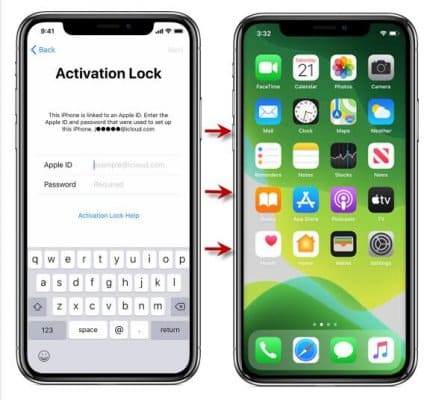
iPhones are harder to fake, but duplicates do exist—usually running modified Android software.
6. Check Serial Number and Model Number
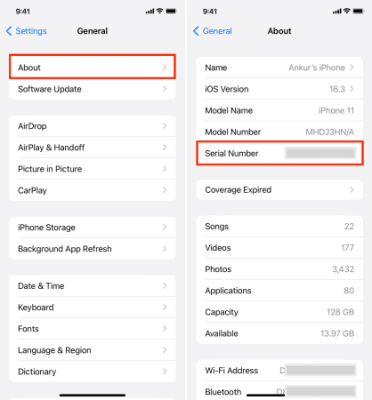
Go to Settings → General → About and note:
- Serial Number
- Model Number
Verify these details on Apple’s official coverage page.
If the serial number is invalid or shows a different model, the phone is not original.
7. Check the App Store
Original iPhones only have the Apple App Store.
If you see:
- Google Play Store
- Dual app stores
- Android-style settings
👉 The phone is 100% fake.
If you have mistakenly deleted media from your iPhone, here are ways to recover permanently deleted photos and videos from your iPhone.
8. Test iCloud and Apple ID
Try signing in with an Apple ID.
Original iPhones support:
- iCloud
- iMessage
- FaceTime
Fake devices usually fail or redirect to unknown services.
9. Check Software Updates
Go to Settings → Software Update.
Original iPhones:
- Receive official iOS updates
- Show clear version and size details
Fake ones:
- Show errors
- Don’t receive updates
- Display misleading messages
Physical Checks to Identify a Duplicate Phone
10. Build Quality and Finish
Check:
- Button feel and alignment
- Camera lens quality
- Speaker sound clarity
- Charging port placement
Original phones always feel solid and well-finished.
It is equally important to check if the LCD display is original or duplicate along with other checks.
11. Check the Box and Accessories
Inspect:
- Print quality on the box
- Spelling mistakes
- Missing serial number stickers
- Low-quality charger or cable
Original phones come with proper branding and documentation.
12. Test Camera Performance
Open the camera and check:
- Focus speed
- Photo clarity
- Video stabilization
Duplicate phones often:
- Use fake multi-camera effects
- Produce blurry images
- Record low-quality video
How to Safely Buy a Used or Refurbished Phone
Buying used phones needs extra care.
Checklist for Used Phones
- IMEI should be clean and active
- Phone should factory reset properly
- No unknown device management lock
- Battery health should be reasonable
- Network should work with your SIM
Avoid phones that cannot be fully reset.
Common Myths About Duplicate Phones
- Myth: Fake phones look cheap
Truth: Many look almost identical externally - Myth: Only Android phones are duplicated
Truth: Fake iPhones also exist - Myth: Duplicate phones are easy to detect
Truth: Some require careful software checks
Quick Checklist Before You Buy
Before paying, confirm:
- IMEI matches everywhere
- Correct brand and model shown
- Official app store available
- Hardware details are accurate
- No spelling or software errors
If even one major check fails, don’t buy the phone.
Frequently Asked Questions (FAQs)
1. Can a duplicate phone show fake specifications?
Yes. Many duplicate phones display fake RAM, storage, or model details in settings. That’s why checking actual hardware information is important before buying.
2. Are duplicate phones only found in used or refurbished markets?
No. While duplicate phones are more common in used or refurbished markets, they can also appear in online listings or unofficial stores, especially when prices seem unusually low.
3. Is checking the IMEI number enough to confirm a phone is original?
IMEI checking is very important, but it should be combined with software, hardware, and physical checks for complete confirmation. Using multiple checks gives the safest result.
Final Thoughts
Checking whether a phone is original or duplicate is not difficult—but it does require attention. Always remember:
A genuine smartphone has a verified IMEI, authentic software, accurate hardware details, and official support.
Never rush your purchase. A few careful checks can save you from long-term problems and financial loss.