Introduction
Many iPhone users are surprised—or even worried—when they notice their battery health percentage dropping faster than expected. One day it shows 95%, and a few months later it’s suddenly 88% or lower. This often raises questions like: Is something wrong with my phone? Did a software update damage the battery? Do I need a replacement already?
Battery health is one of the most misunderstood parts of owning a smartphone. While the decline can feel alarming, it is usually the result of normal battery aging combined with everyday usage habits.
In this article, you’ll learn:
- What iPhone battery health actually means
- Why it sometimes drops quickly
- What factors accelerate battery wear
- Practical, real-world fixes to slow it down
- When a battery replacement truly makes sense
The goal is clarity—no panic, no myths, just accurate and useful guidance.
Understanding iPhone Battery Health (In Simple Terms)
What is Battery Health?
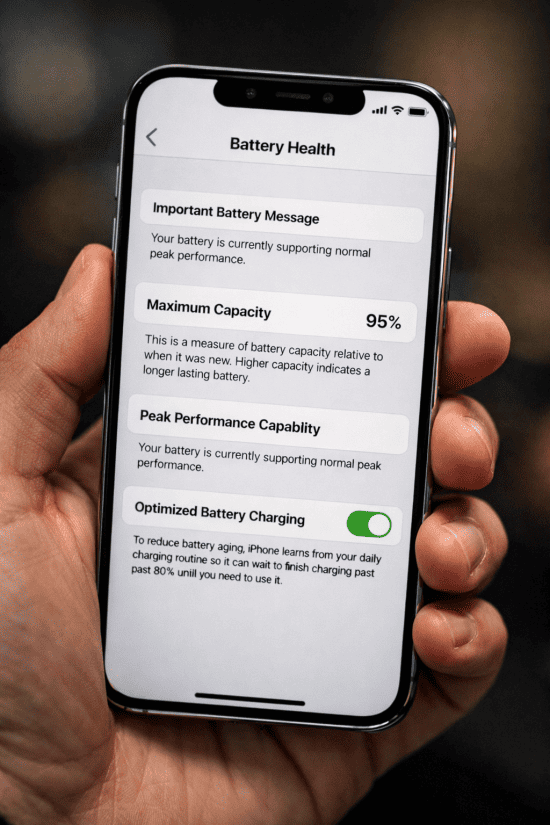
Battery health shows the maximum capacity your iPhone battery can hold compared to when it was new.
- 100% = Brand new battery
- 90% = Holds 90% of original charge
- 80% = Holds only 80% of original charge
This percentage is visible in:
Settings → Battery → Battery Health & Charging
Why Lithium-Ion Batteries Degrade
All iPhones use lithium-ion batteries. These batteries:
- Age chemically over time
- Wear out with charge cycles
- Lose capacity even if the phone is rarely used
According to Apple, iPhone batteries are designed to retain around 80% capacity after about 500 full charge cycles under normal conditions.
This means battery health decline is expected, not a defect. You have to understand 80% battery health rule and when should you actually replace an iPhone battery as suggested by Apple.
What Is “Fast” Battery Health Drop?
Battery health does not drop in a perfectly smooth line. However, as a general guideline:
- Normal: 5–10% drop per year
- Moderate: 10–15% per year
- Fast: 15%+ in under a year
A sudden drop may also appear after:
- A major iOS update
- Recalibration of battery statistics
- Prolonged heat exposure
Understanding the cause is more important than the number itself.
Main Reasons iPhone Battery Health Drops Fast
1. Excessive Heat (The Biggest Battery Killer)
Heat is the number one enemy of lithium-ion batteries.
Common heat sources:
- Fast charging
- Gaming for long sessions
- Using navigation while charging
- Leaving the phone in a hot car
- Thick cases that trap heat
Even short exposure to high temperatures can permanently reduce battery capacity. According to Consumer Reports’ smartphone battery longevity tips, avoiding heat and extreme charging habits is key to extending battery lifespan.
How iPhone Battery Health Changes Over Time (Typical Use)
| Phone Age | Expected Battery Health |
|---|---|
| 0–6 months | 95–100% |
| 6–12 months | 88–95% |
| 1–2 years | 80–88% |
| 2–3 years | 70–80% |
| 3+ years | Below 75% |
Real-world example:
Using Google Maps on a dashboard mount while charging in summer can degrade battery health much faster than normal.
2. Frequent Fast Charging
Fast charging is convenient—but it generates more heat.
Occasional fast charging is fine. Problems arise when:
- You fast-charge multiple times daily
- You fast-charge from very low (0–10%) repeatedly
Over time, this stress accelerates chemical wear inside the battery.
3. Charging to 100% Too Often
Keeping your battery at 100% for long periods stresses it chemically.
Common habits:
- Charging overnight every day
- Keeping the phone plugged in after full charge
iPhones manage this better now, but the impact still exists—especially on older models.
4. Deep Discharging (0–5% Frequently)
Letting your iPhone drain completely before charging may feel harmless, but it increases wear.
Batteries prefer staying between 20% and 80%.
Repeated deep discharges shorten overall lifespan.
5. Heavy Performance Usage
Battery health drops faster if you frequently:
- Play graphics-heavy games
- Edit videos
- Use the camera for long periods
- Run multiple apps constantly
These activities increase:
- Power draw
- Internal temperature
- Charge cycle usage
6. Poor Signal Areas
When signal is weak:
- Your phone works harder to stay connected
- Battery drains faster
- Heat increases
Living or traveling in low-signal areas can subtly affect battery health over time.
7. Battery Calibration Changes (Looks Sudden, Isn’t)
Sometimes battery health appears to drop suddenly because:
- iOS recalibrates health estimates
- The measurement becomes more accurate
This does not always mean real damage happened overnight.
Smartphone batteries are becoming more advanced every year. Solid-state batteries may replace lithium ion batteries in the future and are seen as the next big upgrade.
Common Myths About iPhone Battery Health
❌ “iOS updates ruin battery health”
Updates may change how health is measured, but they do not physically damage the battery.
❌ “Closing apps improves battery health”
Force-closing apps frequently does not protect battery health and may increase power usage.
❌ “New phones shouldn’t lose health at all”
Even unused lithium-ion batteries age from day one. Let’s clear up some other common phone battery myths you should stop believing.
Signs Battery Health Is Affecting Real Usage
Battery health matters most when it affects daily use. Watch for:
- Faster-than-usual drain
- Unexpected shutdowns
- Phone getting warm easily
- Performance slowdowns
These signs usually appear below 80–85% health, but can vary by model and usage.
How to Slow Down iPhone Battery Health Degradation
1. Avoid Heat Whenever Possible
- Remove case during charging if it gets warm
- Don’t charge under pillows or blankets
- Avoid using heavy apps while charging
2. Use Optimized Battery Charging
Enable it in:
Settings → Battery → Battery Health & Charging
This feature:
- Delays charging past 80%
- Reduces overnight battery stress
3. Don’t Obsess Over 100%
Try to unplug between 80–90% when convenient.
You don’t need to be perfect—just consistent.
4. Use Fast Charging Strategically
- Fine when needed
- Avoid multiple fast charges daily
5. Keep iOS Updated
Updates often include:
- Battery management improvements
- Efficiency optimizations
6. Improve Signal When Possible
- Use Wi-Fi calling
- Enable Airplane Mode in no-signal areas
Learn why iPhones may slow down after major iOS updates. In some cases, reduced battery health can further limit performance to maintain system stability.
Before You Replace the Battery, Try This
- Restart phone
- Update iOS
- Check battery usage (Settings → Battery)
- Disable unnecessary background refresh
- Reset settings (not data)
When Should You Replace the iPhone Battery?
Battery replacement is usually worth considering when:
- Health drops below 80%
- Phone shuts down unexpectedly
- Battery doesn’t last half a day
- Performance feels consistently poor
Is Replacing the Battery Safe?
Yes. A quality replacement:
- Restores battery life
- Improves performance
- Extends phone lifespan by years
For most users, battery replacement is far cheaper and more sustainable than buying a new phone.
Pros and Cons of Replacing vs Living With It
Battery Replacement
Pros
- Restores battery life
- Improves performance
- Cost-effective
Cons
- Temporary expense
- Requires service visit
Continuing Without Replacement
Pros
- No immediate cost
Cons
- Poor battery life
- Performance throttling
- Daily inconvenience
Practical Takeaways (Quick Summary)
- Battery health decline is normal
- Heat is the biggest cause of fast degradation
- Charging habits matter more than charger brand
- 80% health is a guideline, not a deadline
- Replacement is often the smartest long-term fix
Habits That Speed Up Battery Health Loss
- Charging while gaming
- Using navigation + charging in hot cars
- Daily fast charging from 0–100%
- Using thick cases during charging
- Ignoring phone overheating warnings
FAQs
1. Is it normal for battery health to drop 5% in a few months?
Yes, especially during the first year or with heavy use.
2. Does fast charging permanently damage the battery?
Not immediately, but frequent fast charging increases wear over time.
3. Should I stop charging overnight?
Use Optimized Battery Charging. Overnight charging alone isn’t harmful.
4. Why did my battery health drop suddenly after an update?
Likely recalibration, not sudden battery damage.
5. Is 80% battery health bad?
Not bad, but it’s when performance issues may start appearing.
6. Can battery health ever increase?
No. It may appear stable, but it never truly goes up.
7. Does wireless charging affect battery health?
It can generate more heat than wired charging, which may increase wear if used frequently.
Conclusion
Seeing your iPhone battery health drop fast can feel frustrating, but in most cases, it’s the result of normal battery aging combined with everyday usage patterns—not a fault or failure.
By understanding what battery health really means, avoiding excess heat, using smart charging habits, and knowing when replacement makes sense, you can extend your iPhone’s usable life significantly.
If your phone still meets your needs, a battery replacement is often all it takes to make it feel new again—no upgrade pressure required.