Introduction
Over time, almost every iPhone user notices the same problem. The phone that once lasted all day now needs charging by afternoon. Apps feel slower. The battery percentage drops faster than expected. When you check Battery Health in settings, you see a number close to—or below—80%.
This raises an important question:
Is 80% battery health the right time to replace your iPhone battery?
Apple does not randomly choose this number. The 80% battery health rule is based on how lithium-ion batteries age and how reduced capacity affects real-world performance. Yet many users misunderstand what the number means, when replacement is actually necessary, and whether waiting longer can cause damage.
This article explains the topic clearly and practically. You will learn how iPhone battery health works, why the 80% mark matters, signs that replacement is needed, common mistakes to avoid, and how to make the best decision for your phone and usage.
What Is iPhone Battery Health?
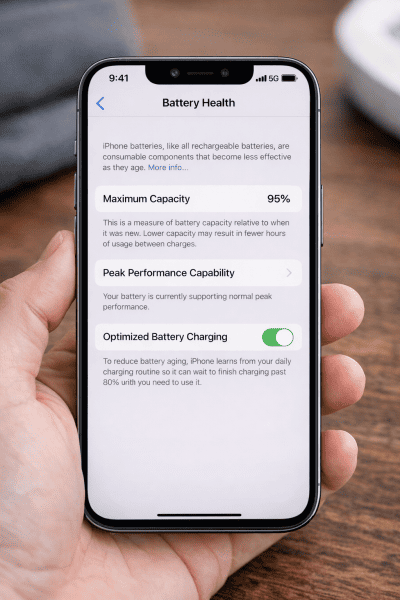
iPhone battery health shows the maximum capacity of your battery compared to when it was new.
- A new iPhone battery starts at 100% health
- Over time, chemical aging reduces capacity
- The percentage reflects how much charge the battery can hold now
For example:
- 100% health = holds full original capacity
- 90% health = holds about 90% of original capacity
- 80% health = holds about 80% of original capacity
This does not mean the battery is broken. It means it cannot store as much energy as before.
With newer iOS versions focusing more on battery efficiency, understanding battery health matters more than ever.
Where to Check Battery Health on iPhone
You can check battery health directly on your device:
- Open Settings
- Tap Battery
- Tap Battery Health & Charging
- Look at Maximum Capacity
You may also see a message about Peak Performance Capability, which becomes important as the battery ages.
Why the 80% Battery Health Rule Exists
The 80% rule is not a marketing trick. It is based on how lithium-ion batteries behave after repeated charge cycles.
Battery Chemistry and Aging
Every time you charge and discharge your iPhone, it completes part of a charge cycle. Over hundreds of cycles:
- Chemical reactions inside the battery become less efficient
- Internal resistance increases
- The battery struggles to deliver power during heavy tasks
By the time battery health drops to around 80%, these effects become noticeable to most users.
What Happens to an iPhone at 80% Battery Health?
At around 80%, several changes may occur.
Reduced Battery Life
The most obvious change is shorter usage time.
- You may need to charge more often
- Standby drain may increase
- Battery drops faster under load
According to Apple’s official battery health guidelines, iPhones are designed to retain up to 80% of their original battery capacity after 500 complete charge cycles under normal conditions.
Performance Management May Activate
iPhones are designed to prevent sudden shutdowns. When a battery cannot deliver enough power, iOS may reduce performance.
This can lead to:
- Slower app launches
- Reduced gaming performance
- Lag during multitasking
You may see a message stating that performance management is enabled.
Unpredictable Shutdowns (In Some Cases)
Not all phones experience this, but aging batteries can:
- Shut down unexpectedly at higher percentages
- Drop quickly from 20% to 0%
- Behave inconsistently in cold conditions
Does 80% Battery Health Mean You Must Replace the Battery?
No.
80% is a guideline, not a strict rule.
Many iPhones continue working fine at:
- 78%
- 75%
- Even lower, depending on usage
Battery replacement should be based on real-world experience, not the number alone.
Battery University’s lithium-ion battery degradation research shows batteries naturally degrade over charge cycles, and capacity loss below 80% significantly impacts real-world usage.
Signs You Should Replace Your iPhone Battery
Battery health percentage is only part of the decision. These practical signs matter more.
1. Battery Does Not Last Through Your Day
If your phone:
- Needs multiple charges daily
- Cannot last your normal routine
then replacement makes sense.
2. Noticeable Performance Slowdowns
If apps lag or the phone feels slow even after updates, the battery may be limiting performance.
3. Frequent or Sudden Shutdowns
Unexpected shutdowns, especially above 10–20%, are a strong signal.
4. Battery Health Warning Messages
If iOS displays messages recommending service, it means the battery is no longer delivering reliable power.
5. Phone Heats Up More Than Before
An aging battery can generate extra heat under normal use.
Situations Where You Can Delay Battery Replacement
Not everyone needs to replace the battery immediately at 80%.
You can wait if:
- Battery life still meets your daily needs
- Performance feels normal
- No shutdowns occur
- You mostly use light apps like messaging and calls
For light users, replacement can often be postponed safely.
Common Myths About iPhone Battery Health
Myth 1: Battery Health Drops Faster After 80%
Battery degradation is gradual. It does not suddenly accelerate just because it reaches 80%.
Myth 2: Low Battery Health Damages the iPhone
A worn battery does not damage the phone itself. It only affects performance and reliability.
Myth 3: Replacing Battery Is Only for Old iPhones
Even newer iPhones may need battery replacement if used heavily or charged improperly.
Here are some more common phone battery myths which you should ignore
How Long Does an iPhone Battery Usually Last?
Apple designs iPhone batteries to retain about 80% capacity after roughly 500 full charge cycles.
In real life:
- Heavy users may reach this in 1.5–2 years
- Moderate users may take 2–3 years
- Light users may take longer
Charging habits, heat exposure, and usage patterns all matter.
Battery Health vs Battery Performance: Key Difference
Battery health measures capacity.
Battery performance measures power delivery.
A battery can show:
- 82% health
but still struggle with: - Peak power delivery
This is why performance issues can appear even above 80% in some cases.
Should You Replace the Battery or Upgrade the iPhone?
This depends on your situation.
Battery Replacement Makes Sense If:
- Your iPhone still meets your needs
- Software updates are supported
- Performance improves with a new battery
Upgrading Makes Sense If:
- The phone no longer receives updates
- Other hardware issues exist
- You need features newer models offer
Replacing a battery is often far cheaper than buying a new phone.
Pros and Cons of Replacing iPhone Battery at 80%
Pros
- Restores battery life
- Improves performance
- Prevents shutdowns
- Extends phone lifespan
Cons
- Cost involved
- Not always necessary immediately
- Minor inconvenience during replacement
Practical Tips to Slow Battery Health Degradation
While replacement is inevitable, you can slow degradation.
- Avoid extreme heat
- Do not keep the phone at 0% or 100% for long periods
- Enable optimized battery charging
- Use original or certified chargers
- Avoid heavy gaming while charging
These habits help preserve long-term battery health.
Is It Safe to Use an iPhone Below 80% Battery Health?
Yes. It is safe.
Using an iPhone below 80%:
- Does not harm internal components
- Does not cause data loss
- Does not pose safety risks under normal conditions
The main trade-offs are convenience and performance.
When Should You Replace Your iPhone Battery?
- Battery doesn’t last a full day
- Phone shuts down unexpectedly
- Performance feels slower
- Battery health is near or below 80%
- iOS shows a battery service warning
When NOT to Replace the Battery
- Phone no longer receives updates
- Multiple hardware issues exist
- Cost is close to phone’s resale value
- You already plan to upgrade soon
Battery Health Percentage Chart: User Experience & Replacement
| Battery Health | Typical Experience | Replace? |
|---|---|---|
| 90–100% | Normal performance | No |
| 85–89% | Slightly reduced battery life | Not needed |
| ~80% | Shorter battery life, possible slowdown | Consider |
| <75% | Frequent charging, shutdown risk | Recommended |
What to Do Next
- Check your battery health regularly
- Monitor real-world performance, not just numbers
- Decide based on daily usage, not fear
- Replace battery only when it improves your experience
Lithium-ion batteries are common today, but new battery types are being developed. Solid-state batteries may be safer and bettery. Can Solid-State Batteries Replace Lithium-Ion in Future Smartphones?
Frequently Asked Questions (FAQs)
1. Is 80% battery health bad for an iPhone?
No. It indicates normal battery aging, not a defect.
2. Will replacing the battery make my iPhone faster?
In many cases, yes. Especially if performance management was active.
3. Can battery health increase after an update?
No. Battery health does not increase; it may recalibrate slightly.
4. Is it okay to wait until battery health drops below 75%?
Yes, if performance and battery life are acceptable.
5. Does fast charging reduce battery health faster?
Frequent heat exposure can contribute to faster aging over time.
6. Should I replace battery before selling my iPhone?
It depends. A new battery can improve resale value, but may not always be necessary.
7. Does battery replacement affect data?
No. Battery replacement does not erase data when done correctly.
Conclusion
The 80% battery health rule is a practical guideline, not a deadline.
An iPhone at 80% battery health is still usable, safe, and functional. Replacement becomes the right choice when battery life, performance, or reliability no longer match your daily needs—not just because of a number in settings.
Should We Replace iPhone Battery at 80% Health?
You don’t need to replace an iPhone battery exactly at 80% health. Replace it when battery life, performance, or reliability no longer meets your daily needs.
For many users, replacing the battery can restore performance and extend the phone’s life by years. For others, waiting makes sense. The key is to judge based on real-world experience, not fear or confusion.
Understanding how battery health works helps you make a calm, informed decision that saves money and keeps your iPhone working smoothly.