Smartphones today are no longer just calling devices. They are cameras, wallets, work tools, and entertainment systems packed into one small body. Phones from the Xiaomi ecosystem — including Mi, Redmi, and Poco — are feature-rich and powerful, but like any electronic device, they can develop issues over time.
A full diagnostic test helps you understand what is happening inside your phone. It checks whether hardware parts and software functions are working properly. Many problems can be detected early, even before the phone shows visible symptoms.
“A quick diagnostic today can save you from a costly repair tomorrow.”
This guide explains all working methods to run diagnostics on Xiaomi-based smartphones. It is written from both a user perspective and a technician’s workflow, making it useful for beginners, advanced users, and mobile repair professionals.
What Is a Diagnostic Test on a Mobile Phone?
A diagnostic test is a structured process that checks different components of a mobile phone to confirm whether they are functioning correctly.
On a Xiaomi, Redmi, Mi, or Poco device, diagnostics usually cover:
- Display and touch response
- Speaker, earpiece, and microphone
- Battery and charging system
- Cameras and flash
- Sensors like proximity, accelerometer, gyroscope
- Network, Wi-Fi, Bluetooth, and GPS
- Buttons, vibration motor, and ports
These checks can be performed using:
- Hidden QC (quality check) codes
- Built-in system tools
- Manual mobile inspection tests
- Diagnostic tool apps
- Diagnostic test online methods
If you want to learn mobile software repairing, join Prizm Institute’s mobile software flashing and unlocking course in Mumbai and stay updated with the latest tricks and techniques in the field.
When Should You Run a Full Diagnostic Test?
You do not need to wait for a serious issue. Diagnostics are useful in many everyday situations:
- Before giving your phone for repair (Pre-Repair Diagnostic)
- After repair to confirm everything works (Post-Repair Diagnostic)
- Before buying a used Xiaomi or Redmi phone
- When the phone heats up, lags, or drains battery fast
- If camera, speaker, or network behaves abnormally
- As a routine mobile inspection test every few months
Professionals always test phones at multiple stages, not just when something breaks.
Method 1: Xiaomi / Redmi / Poco Diagnostic Test Codes (QC Codes)
Official Diagnostic Test Codes
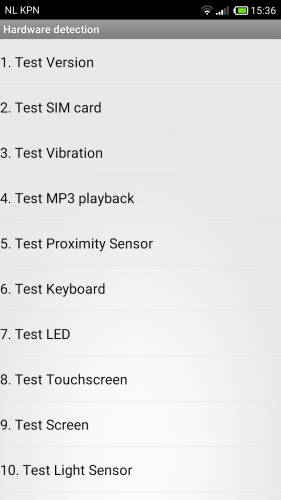
Xiaomi phones include powerful factory testing menus used in manufacturing and service centers. The most common quality check (QC) codes are:
- *#*#64663#*#*
- *#*#6484#*#*
These codes open the CIT (Control and Identification Test) menu.
How to Use the Code
- Open the phone dialer
- Dial *#*#64663#*#* or *#*#6484#*#*
- The diagnostic menu opens automatically
- Select tests one by one
Important: These codes do not erase data. They are safe when used only for testing.
What You Can Test Using QC Codes
- Display colors, brightness, and dead pixels
- Touchscreen accuracy
- Loudspeaker and earpiece
- Microphone recording
- Vibration motor
- Cameras and flash
- Proximity, light, and motion sensors
- Buttons and fingerprint sensor
- Charging response
This is the most complete built-in diagnostic method available on Xiaomi-based phones.
Related Phone Diagnostic Guides:
- OnePlus hardware testing guide
- Samsung phone service-level diagnostic tests explained
- Vivo phone diagnostic pre-repair and post-repair tests
- Realme phone hardware diagnostic inspection and QC testing
- How to run a diagnostic test on a Oppo phone used by technicians
Method 2: Built-In Diagnostics in MIUI / HyperOS
Some Xiaomi phones provide basic diagnostic or status tools inside system settings.
How to Access
- Open Settings
- Go to About Phone
- Check Status, All Specs, or Device Health
These sections may show:
- Battery condition indicators
- Network and SIM status
- Storage and memory usage
This method is simple and beginner-friendly but less detailed than the QC menu.
Method 3: Manual Mobile Inspection Test (Technician Style)
Professional technicians never rely only on software menus. They always perform a manual mobile inspection test.
Display and Touch Check
- Increase brightness fully
- Look for color patches or flickering
- Test multi-touch with pinch and zoom
Audio Test
- Play music at low and high volume
- Test call speaker during a call
- Record voice notes and replay
Camera Test
- Focus on near and far objects
- Test video recording
- Check flash brightness
Buttons and Ports
- Press power and volume buttons repeatedly
- Check charging cable grip
- Test USB data connection
Manual inspection often reveals issues that automated tests miss.
Method 4: Diagnostic Tool Apps (Supporting Method)
A trusted diagnostic tool app can help when built-in options are limited or blocked.
What These Tools Usually Test
- Sensors and motion detection
- CPU and RAM usage
- Battery discharge patterns
- Network signal behavior
Use these tools only from trusted sources. Avoid apps that:
- Promise “battery repair”
- Show unrealistic health percentages
- Ask for unnecessary permissions
These tools are best used as supporting diagnostics, not final proof. If you’re curious about how to check Android phone health using free diagnostic tools, this guide walks you through the methods available. It’s helpful for both users and beginners in mobile repair.
Method 5: Diagnostic Test Online – What It Can and Cannot Do
Many users search for diagnostic test online, expecting a full scan through a browser. Online diagnostics have limitations.
What Online Tests Are Useful For
- Touchscreen response checks
- Speaker and microphone testing
- Camera preview checks
- Internet speed and latency tests
What Online Tests Cannot Do
- Access internal sensors fully
- Check charging IC or motherboard
- Replace factory QC menus
Online testing is helpful for quick checks, especially on borrowed or secondary devices.
Pre-Repair Diagnostic: A Must Before Any Repair
A pre-repair diagnostic is done before opening the phone or replacing parts.
Why It Matters
- Confirms existing faults
- Avoids confusion after repair
- Helps estimate repair cost and time
What Is Usually Checked
- Power and boot condition
- Display and touch
- Network and calling
- Audio and camera
Skipping this step can lead to misunderstandings between user and technician.
Post-Repair Diagnostic: Ensuring Repair Quality
After repair, a post-repair diagnostic ensures that the phone works like it should.
Key Checks
- Re-run QC codes
- Test replaced components
- Perform full mobile inspection test
- Confirm charging stability
“A repair without post-testing is only half a repair.”
This step protects both the customer and the service center.
Understanding Diagnostic Results (Simple Explanation)
Pass
- Component is working within normal limits
Fail
- Hardware fault or replacement needed
Inconsistent
- Possible software issue
- Restart and retest
Always verify a failed result using another method.
Common Diagnostic Mistakes Users Make
- Running tests on very low battery
- Testing speakers in noisy environments
- Ignoring heating warnings
- Assuming every issue is hardware-related
Accurate diagnostics need patience and proper conditions.
Technician-Level Keywords Used in Real Repair Work
This article reflects real-world repair terminology, such as:
- Diagnostic tool
- Diagnostic test online
- Pre-Repair Diagnostic
- Post-Repair Diagnostic
- Mobile Inspection Test
- Quality check (QC) code
- Factory CIT menu
- Hardware fault isolation
These terms are commonly used in professional service environments.
Xiaomi Diagnostics vs Other Android Phones
Phones from Xiaomi stand out because:
- CIT menus are easily accessible
- Tests are detailed and structured
- Less restriction compared to many Android brands
This makes Xiaomi, Redmi, and Poco devices popular among technicians and testers.
Practical Tips From Real Usage
- Run diagnostics before major software updates
- Take screenshots of failed tests
- Combine QC codes with manual inspection
- Avoid repeated stress tests on overheating phones
These habits improve long-term device reliability.
Final Thoughts: Make Diagnostics Part of Phone Care
Running a full diagnostic test on a Xiaomi, Redmi, Mi, or Poco phone is simple once you know the methods. Whether you are a regular user or a technician, diagnostics help you make informed decisions.
Use:
- QC test codes for deep hardware checks
- Manual inspection for real-life behavior
- Online and app-based tests for quick validation
“A phone you understand is a phone you can trust.”
Make diagnostics a regular habit, not just a last resort.